|
Getting your Trinity Audio player ready... |
When clients come to us asking for an AI agent, we often find they’ve heard about the technology but haven’t fully worked out what they want it to do.
Before talking about AI agents, Elham Safarzadeh, a Solutions Architect at Whitecap Canada, asks a simple question: “What business problem are you trying to solve, and why do you think an AI agent is the right solution?”
We aim to understand how the process works today, where the problems are and what they expect AI to improve. Sometimes the answer is an agent. Other times, a Power Automate flow will do the job more simply and at lower cost.
Traditional Automation vs AI Agents: What’s the Difference?
The simplest way to tell them apart is to ask whether you can spell out the scenarios and required actions in advance.
Traditional automation works well when the possibilities are known and the rules can be clearly defined. A record is created, so a notification is sent. A request meets certain criteria, so it is routed to a particular team. Data changes in one system, so another system is updated. Microsoft Power Automate is well suited to this kind of predictable, repeatable work.
AI agents come into play when the inputs vary, context matters and the next step depends on interpreting the information. An agent can understand a request, look up the information it needs and decide what to do next within defined boundaries. Copilot Studio can be used to build agents that work with business data and systems.
Not every process that needs some interpretation needs an agent, either. Sometimes AI only needs to handle one part of the workflow. Power Automate might use AI to extract information from a document or classify an incoming request, for example, and then continue through a predefined process.
So, there are a few different ways this can look:
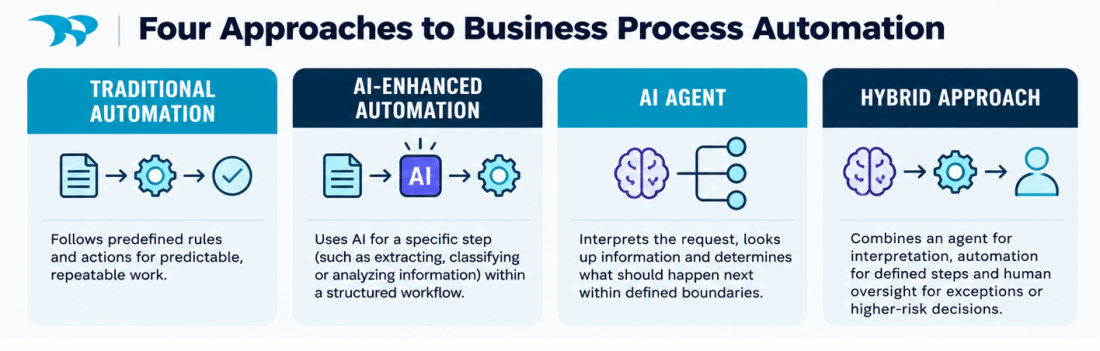
- Traditional automation: Power Automate creates a case when a form is submitted.
- AI-enhanced automation: Power Automate uses AI to extract or classify information from the request before creating the case.
- AI agent: Copilot Studio interprets the request, looks up relevant information and decides what should happen next within defined boundaries.
- Hybrid: An agent handles the interpretation, Power Automate carries out the predictable steps, and a person steps in for exceptions or higher-risk decisions.
The right solution often boils down to what the process needs.
A Complex Process Does Not Automatically Need AI
The assumption that a complex process must need AI is “100% incorrect,” according to Elham. A workflow can have dozens of conditions and still be a job for traditional automation, as long as every one of those conditions can be clearly defined.
She points to The Scott Mission, a Toronto non-profit that originally engaged Whitecap to replace a legacy CRM with Dynamics 365 and Power Automate. She is now building a kiosk for the people who use the Mission’s services. Think of ordering at a self-serve fast-food kiosk, she says, except here people are booking appointments for things like clothing and food.
Showing which times are available is harder than it looks. The system has to account for the Mission’s closure times, breaks and statutory holidays. From 9:00 to 9:15, only 12 appointments can be booked, so once the twelfth is taken, that slot is greyed out on the calendar. There is a lot of logic behind that simple-looking calendar, but every rule is known in advance.
“It’s complex,” Elham says. “But I don’t need AI because it’s not something that the system needs to predict or interpret.”
The same goes for plenty of everyday Power Automate work: sending notifications when a record is created or updated, routing requests based on predefined conditions, syncing data between systems, creating Dynamics 365 records from another system, running scheduled tasks and managing approval workflows. If the rules are known, traditional automation is usually more predictable, easier to test and easier to maintain.
The picture changes when part of the process depends on reading something and working out what it means.
When One AI Capability Is Enough
A recent field service client meeting offered a good example. The client’s inspectors travel to different sites to carry out surveys and scheduling them depends on a lot of known information: where each inspector is, how far they would have to travel, what it would cost and who is available. Traditional automation can handle all of that.
What it can’t do is interpret emotional tone and intent. Say an email arrives from a customer who is unhappy with the service they received. That could change how the case should be handled. It might be worth sending an inspector right away, even if the site is far away, especially if it’s an important client. Traditional automation can evaluate customer satisfaction when it is based on predefined information, such as survey scores or ratings. However, understanding whether a customer is unhappy based on the language and tone of an email is much harder with traditional rules. AI can analyze the message and help determine whether the case should receive higher priority.
The rest of the workflow can stay as it is. Distance and cost are still calculated the way they always were, and AI only handles the part that needs interpretation. That’s AI-enhanced automation: one AI step inside an otherwise predictable workflow.
When an AI Agent Makes Sense
Now take a process where interpretation isn’t just one step. A company receives emails from customers about all sorts of things. Some are simple questions. Others are complaints, technical problems or requests that mean looking back at previous interactions.
Traditional automation can route those emails by keyword, sender or predefined category. It gets harder when customers describe similar issues in different ways, or when the right response depends on understanding earlier conversations. Handling each email well means understanding what the customer is asking, looking up information from different sources and deciding what to do next.
An agent built with Copilot Studio could:
- Understand the request and identify the main issue
- Review previous interactions stored in Dynamics 365
- Search approved knowledge sources for relevant information
- Determine whether the issue can be resolved with the information available
- Recommend the next action or prepare a response
- Escalate when it can’t confidently determine the right action
That’s where an agent could add real value. The process needs context and interpretation, not just predefined conditions. In the last example, AI handled one step inside a fixed workflow. Here, what the agent understands decides what happens next.
Why a Hybrid Approach Often Makes Sense
A hybrid approach can be a practical way to bring AI agents into an existing business process. Here’s how it could work for a company that receives service requests through a shared mailbox:
- Power Automate detects a new email in the shared mailbox.
- An AI agent reviews the email, understands the request and checks relevant information in Dynamics 365 or another approved source.
- The agent determines the category, priority and recommended next action.
- Power Automate uses that information to create or update a case in Dynamics 365, assign it to the right team and send a notification.
- If the request involves a sensitive decision, or the agent can’t determine the right action, a person reviews it.
The agent handles interpretation, and Power Automate handles the predictable steps and system updates. People step in for exceptions and higher-risk decisions.
Adding an agent doesn’t mean replacing the automation you already have. It can handle the part that needs interpretation while the existing automation keeps doing the predictable work.
Before You Put an AI Agent Into Production
Building a basic agent or demo can be relatively straightforward, but making it reliable, secure and ready for production is a different challenge.
– Elham Safarzadeh, Solutions Architect
That challenge comes down to governance and security, what data the agent can reach, what it’s allowed to do and what it’s not allowed to do. An agent can’t be handed company data and left to work out the business process on its own. It needs clear instructions, reliable information, the right permissions, defined boundaries and ongoing monitoring. You don’t need a perfect data environment or a fully mature AI strategy to get started, but the data and controls behind your specific use case do need to be sound.
Testing works differently, too. Once a traditional workflow has been tested, input A should always produce output B. AI may not give exactly the same response every time, so an agent has to be tested against realistic data and scenarios, and that takes time.
The work doesn’t stop at launch. Agents need maintenance, and licensing and consumption costs belong in the decision from the start. When a client is considering an agent, we lay out both routes, the AI option and the more traditional one, along with what each involves in testing, maintenance and cost, so they can decide with the trade-offs in view.
If you’re new to agents, start with a small, lower risk use case instead of putting an agent straight into a critical business process.
How Much Autonomy Should You Give an AI Agent?
What happens if the agent gets something wrong? That question should set how much autonomy it gets, and the decision based mainly on the risk and impact of the action.
Retrieving information, summarizing records, categorizing requests and preparing draft responses are relatively low risk tasks that an agent can handle without human approval. Case management can also be a good place to start, since the consequences of a mistake are generally lower.
More caution is needed with actions such as issuing refunds, changing financial information, deleting records, making contractual commitments or sending sensitive communications. Those may need additional validation or a person’s approval.
Elham is especially cautious around financial and confidential data. She checks what information is being sent to the AI, and with something like wiring money, she would not leave the decision to AI alone. She wants defined logic or a person involved in the approval. An agent should only have the permissions and autonomy it needs to do its job, with logging in place and a way to deal with errors or unexpected situations.
Before You Automate, Look at the Process
You’ll often hear “don’t automate a bad process.” In practice, that means not using technology to automate unnecessary steps, inefficient workflows or processes that are already causing problems.
Say every customer request goes through three levels of approval, even when the request is simple and there’s not much at stake. Power Automate or an AI agent could certainly speed those approvals up. But the real question is whether all three levels are necessary in the first place.
Or think about employees who copy the same information into several systems. Automating the copying would save time, but it’s worth understanding why the information is duplicated and whether the systems could be connected more effectively. Sometimes the best first step is simplifying the process. Once it’s worth automating, the next question is which approach fits.
How Do You Choose Between Traditional Automation, AI and an Agent?
Start with what the process requires. The examples in this article land in different places:
What the Process Requires | Approach to Consider | Examples |
Known triggers, rules and actions | Traditional automation with Power Automate | The Scott Mission appointment calendar |
One step that requires extraction, classification or interpretation | AI-enhanced automation | Prioritizing a field service case when a customer is unhappy |
Context, interpretation and deciding what should happen next | AI agent with Copilot Studio | Customer support emails that depend on earlier conversations |
Interpretation followed by predictable execution | Hybrid agent + Power Automate | Service requests arriving in a shared mailbox |
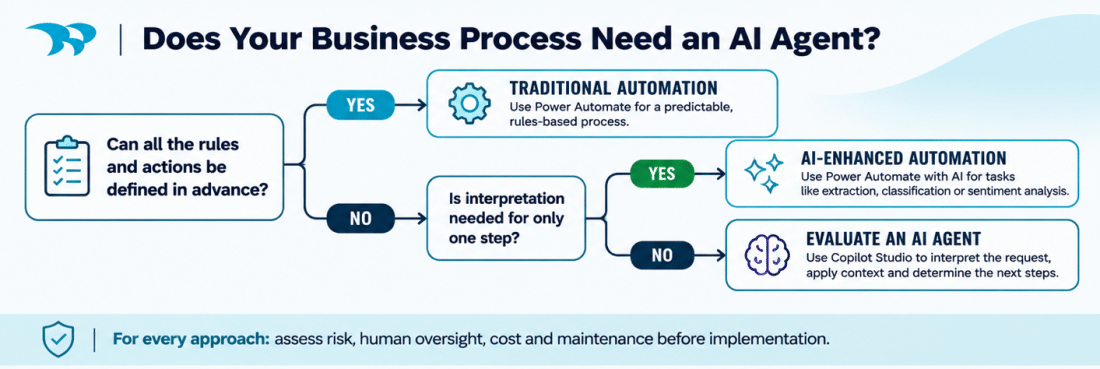
A few questions can help narrow it down:
- Can the business rules be clearly defined? If so, start with Power Automate.
- If not, does interpretation affect one step, or what happens next?
- What happens if the system gets something wrong, and where does a person still need to be involved?
- Does AI add enough value to justify the extra testing, cost and oversight?
Start With the Business Problem
Asked for one piece of advice for a business leader before investing in AI agents, Elham’s answer was short:
Make sure that you understand what you are trying to resolve.
– Elham Safarzadeh, Solutions Architect
It echoes the question this article started with. Once the problem is clear, the choice between traditional automation, a single AI step, an agent or a hybrid gets a lot simpler. And sometimes the answer is the simpler solution.
We help organizations assess their business processes and AI needs, and then choose the right mix of Power Automate, Copilot Studio, Power Apps, Dynamics 365, and custom software development. If you’re weighing an agent for a process right now, we’d be happy to talk it through. Let’s chat.
Frequently Asked
Q: What is the difference between AI agents and traditional automation?
A: Traditional automation follows predefined rules to complete predictable, repeatable tasks. AI agents can interpret information, consider context and determine what action to take within defined boundaries. Traditional automation is generally better suited to structured workflows, while AI agents are useful when decisions depend on understanding variable inputs or information from multiple sources.
Q: When should a business use an AI agent instead of Power Automate?
A: An AI agent may be appropriate when a process requires interpreting unstructured information, reviewing context or determining different next steps based on what it discovers. If the business rules and actions can be clearly defined in advance, Microsoft Power Automate is often a simpler, more predictable and cost-effective solution.
Q: Can Microsoft Power Automate use AI without an AI agent?
A: Yes. Power Automate can incorporate AI capabilities into existing workflows without requiring a standalone agent. For example, AI can extract information from documents, classify incoming requests or analyze customer sentiment. Power Automate can then use those results to execute predefined actions, such as routing requests, updating records or triggering approvals.
Q: Can AI agents and Power Automate work together?
A: Yes. Microsoft Copilot Studio agents and Power Automate can work together in a hybrid solution. An AI agent can interpret a request, retrieve relevant information and determine the next action, while Power Automate executes structured workflows and system updates. Human approval can be incorporated for exceptions or higher-risk decisions.
Q: Are AI agents more expensive than traditional automation?
A: AI agents can introduce additional costs related to licensing, consumption, testing, monitoring and ongoing maintenance. Traditional automation is often more cost-effective for predictable, rules-based processes. The right choice depends on whether the agent’s additional capabilities deliver enough business value to justify the added complexity and cost.
Q: What are the risks of using AI agents in business processes?
A: Key risks include inaccurate decisions, inappropriate access to sensitive information, unexpected actions and inconsistent outputs. Organizations can reduce these risks through appropriate permissions, reliable data sources, defined operating boundaries, testing, logging and ongoing monitoring. Higher-risk actions, such as financial transactions or changes to sensitive records, may also require human approval.
Q: How should a business get started with AI agents?
A: Start by identifying a specific business problem and reviewing the existing process. Determine whether the work requires predefined automation, a single AI capability or an agent that can interpret information and determine next steps. For an initial implementation, prioritize a small, lower-risk use case with clear success criteria, appropriate data access and defined oversight.