|
Getting your Trinity Audio player ready...
|
If AI can build an app in one weekend, why does custom software cost so much?
It’s not an unreasonable question to ask. Today, you can open an AI app builder, describe what you want and watch something that looks surprisingly like “working software” appear in minutes. Then you talk to a professional software development company and hear that a custom application could cost $80,000, $300,000 or considerably more.
If one option is free or nearly free, and the other is well into five or six figures, what exactly are you paying for?
Writing code is only one part of building custom software. Any software project also needs to be planned, designed, secured, tested and supported by people who are accountable for it when something goes wrong. AI is already making parts of that work faster – we’ve written before about when AI app builders make sense and when they don’t – but generating code and delivering software a business can rely on are still two entirely different things.
Why a Bridge Doesn’t Surprise You but an App Does
If someone tells you a new bridge will cost $3 billion, you don’t ask why. You can see the scale of it… the steel, labour and the years of work. The complexity is visible, so the cost feels justified.
Building software is just as complex as building bridges and railroads and electrical transmission networks. It’s all engineering. – Jack Golabek, Business Development Executive
Software hides that complexity behind a screen. Take an app like Uber: open it, choose where you’re going, see a map, get matched with a driver. It feels incredibly simple because a tremendous amount of work went into making it feel that way. Underneath that clean interface, a lot is happening: real-time routing, payment processing, infrastructure that has to hold up whether it’s 10 people using it or 10 million.
Custom business software works the same way. The finished product looks straightforward because someone did the invisible work of making it that way. Skip that work and you get software that “works” in the demo but falls apart the moment it meets a real business, with real exceptions and real people who don’t behave the way the happy path assumed they would.
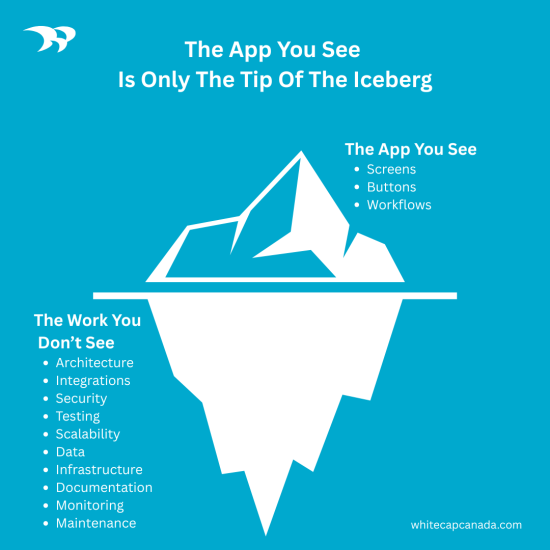
There’s a reason nobody asks an architect to skip the blueprint and start pouring concrete. You wouldn’t build a house without paying an architect to design it first. A custom software project is no different.
Let’s take a closer look at where the money actually goes, and at some things you can do to bring the cost down.
Where the Cost of Custom Software Goes
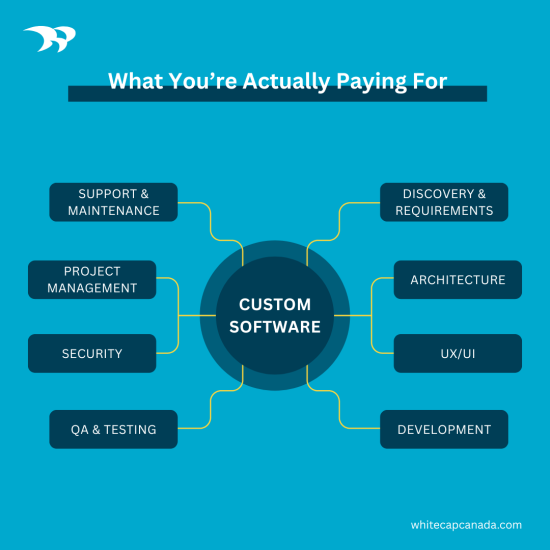
There’s no universal formula for a software budget (though we have shared common factors that affect cost and budgeting tips) and developers will give you different answers about where the time goes. A common estimate is that roughly half goes to writing code. The rest goes to everything that has to happen before, during and after.
Before a single line is written, someone has to run discovery to get a deep understanding of what the business really needs, how people work today, what’s broken and what the new system has to connect to. Then comes architecture: choosing the right technology, designing how the system will scale, and making decisions that are expensive to undo later. And then, UX and UI design shape how real people will actually use the end product in a way that feels natural and intuitive.
Once development starts, it’s not just developers writing code. There’s much more involved. There’s QA to test the code against edge cases, security reviews and a dedicated project manager keeping everything on schedule and moving forward. After launch, there’s documentation and user training. And let’s not forget ongoing maintenance, because software isn’t a one-time purchase; it’s something that has to keep working as the business, its data and its users all change around it.
An Unseen Cost: The Team Behind the Screen
That quote you got isn’t paying for one person coding for a few months. It’s a whole team: business analysts, solution architects, UX/UI people, developers, a project manager, and depending on the project, someone focused on security or infrastructure. All of that costs more than hiring one freelancer. But you’re also getting something different.
Whether we’re building for a large enterprise, a small business or a mom-and-pop shop, the client gets the same people who build for an enterprise-class solution. The size of the client may change but the quality doesn’t. – Dan Carmichael, President
You can absolutely find a single developer, or an overseas team billing $20 an hour, who’ll build you something that runs. For a small internal tool, that might even be the right call. But cheap, fast and good rarely coexist. The corners that get cut usually aren’t visible until later. Testing gets thin, or the architecture that made total sense for five users falls apart at five hundred.
What happens once that application truly matters to your business? If it breaks at 2 in the morning, who do you call? If that one developer picks up three other clients, or just isn’t reachable the week you need them, you’re stuck. With a team, the knowledge of how the system works doesn’t live in one person’s head. That’s part of what the higher price is buying, even though it never shows up as its own line item.
What AI Is Doing to the Price
AI-assisted development tools are already speeding up parts of how Whitecap builds software. They’re genuinely good at things like boilerplate code, scaffolding, repetitive patterns, documentation and test cases. Work that used to take a developer a couple of hours can sometimes take a fraction of that now. We’ve seen this in action and it’s not going away.
What’s gotten faster is the typing. The architecture, the compliance considerations, the reasoning behind why something should be built one way over another, the UX and UI…that part still lives with people, not the tool.
What AI hasn’t figured out is judgment. It doesn’t know why a system should be built one way instead of another, what happens if a particular integration fails, or which edge case is going to matter to your business six months from now. It can produce code that looks right and isn’t. It can miss the one case that only shows up when a customer does something unexpected, or quietly introduce a problem somewhere else in the system while fixing the one in front of it.
There’s also a practical wrinkle that doesn’t get talked about much: these tools need to be managed carefully, or they start working against you. Let a session run too long and the output can drift. Without clear guardrails around the architecture, an AI tool will happily rewrite it. Feed it stale context and it starts filling gaps with hallucinated detail.
As Dan Carmichael puts it, “If nobody on your side truly understands how the code was written, you don’t really own it. AI can write it. It can’t be accountable for it. Someone has to be.” AI can generate code, but it can’t take ownership of it. These tools are still worth using. They just need someone with experience sitting in the middle of the process, reviewing what comes out and deciding what to trust.
AI is making some of the hands-on coding faster, but people still have to decide what should be built and take responsibility when something goes wrong.
Custom Software vs. Power Platform
Microsoft Power Platform has gotten a lot more capable over the past few years. Organizations are using it to build real business applications, automate workflows, and connect systems without starting from scratch. For a lot of projects, it’s a legitimate alternative to custom development, and often a faster one.
Think of it like a sophisticated box of Lego. You can build what’s on the front of the box, or you can arrange the pieces into something tailored to your business. Either way, you’re still working with the shapes the box gives you. You can customize some things, but you shouldn’t drift too far outside the guardrails. Custom software is the opposite. You’re not choosing from what’s available. You’re building exactly what you need, with full control over the code and the IP that comes with it.
That freedom has a cost, and so does the alternative. Power Platform can come with a smaller upfront build cost, but the licensing doesn’t stop once the project ships. One client came to us wanting a portal built on Power Platform, and the build itself was reasonable. Then they found out the ongoing licensing for authenticated users would run about $15,000 a year, on top of what they’d already paid to build it. It’s not hidden. It’s just easy to miss when you’re comparing sticker prices instead of total cost over time.
The real question is whether you want to own the product (IP) outright or pay for access to it indefinitely, and whether the platform’s constraints are something you can live with or something that’ll eventually get in your way.
If the application is mission critical or represents a real competitive advantage, most businesses land on custom. If it doesn’t need to be that bespoke, Power Platform can get you there faster and for less money up front. Sometimes the best solution is a mix of both.
How to Lower Custom Software Costs
Not every item here shrinks the number on the invoice. A couple of them cost money upfront to save more later. But all of them affect what you end up spending, so they belong in the same conversation.
Build Only What You Need
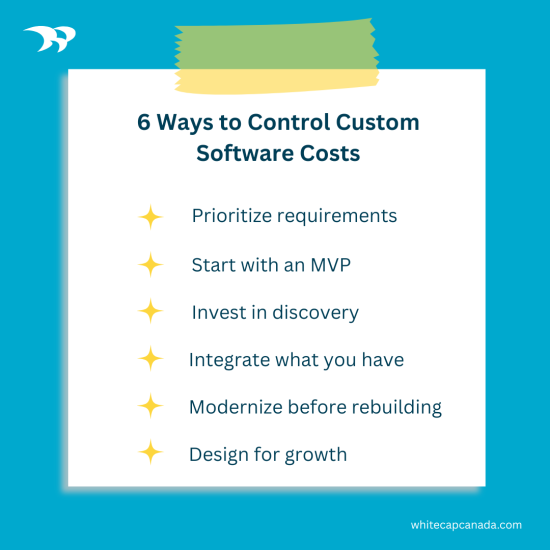
Software is practically limitless. You can always imagine one more feature, and then another, until the first release is trying to solve every current problem and a few hypothetical future ones too. Before development starts, separate what the system needs from what would just be nice to have, and cut the second list down hard. The businesses that keep costs under control are usually the ones willing to do this before the build starts, not after.
Start with an MVP
Strip the build down to what needs to exist for the software to be useful, put it in front of real users, and let their feedback tell you what to build next. It’s a hard discipline to hold to. Stakeholders tend to have strong opinions about what’s essential before anyone has touched the system, and those opinions often change once people are using it.
Pare down the functionality and bells and whistles to the bare minimum… don’t try to boil the ocean at the beginning. – Jack Golabek, Business Development Executive
Spend on Discovery First
This is the one item on this list that costs more, not less, and it’s worth doing anyway. Time and money spent figuring out what you need can save you from spending months and five or six figures building the wrong thing. It’s also where you find out that some of what you assumed you needed to build from scratch already exists somewhere in your organization.
Integrate Instead of Rebuilding What You Already Have
Most businesses already run on a handful of core systems: an ERP, a CRM, Microsoft 365. A new application doesn’t need to replace those or duplicate what they already do well. Connecting to what’s already in place is almost always cheaper than rebuilding it, and it avoids creating two systems that both claim to be the single source of truth.
Modernize Instead of Rebuilding
Older systems don’t always need to be torn out. A financial services client came to us assuming a ten-year-old application needed a full rebuild. Most of it didn’t. The core still worked. What needed attention was the framework underneath it, which was old enough to be a security liability and unable to talk to the newer tools they wanted to add. Modernizing it instead of replacing it saved a significant chunk of the budget.
A logistics client was in a similar spot: rather than a full rebuild, we upgraded the parts of the system that were holding it back and left the rest alone.
This isn’t the right call for every legacy system. Sometimes the technology is indisputably obsolete, or the code is too fragile to extend safely, and a rebuild really is cheaper in the long run than continuing to patch something that’s actively working against you. Never assume a rebuild is the only option. (And be sure to check out our application modernization FAQ here.)
Design for Room to Grow, Not Full Scale Today
It’s tempting to architect for the business you hope to have in five years. Most of the time, that means paying now for capacity, features and flexibility you don’t need yet. Good architecture leaves room to grow without requiring you to build that growth today.
So, What Are You Paying For?
Custom software costs what it costs because building something that has to work, and keep working, is a legitimate challenge, even when the finished product looks simple.
You’re paying for people who take the time to understand the problem before they touch a keyboard. You’re also paying for architecture that can grow with you, testing and security work that often goes unnoticed until you really need it, and a team that’s still there to answer the phone long after launch. Increasingly, you’re paying for people who know how to use AI well without delegating to it the decisions that really matter.
AI is going to keep changing what software costs. Some projects will get cheaper (though it’s important to factor in the ongoing cost token usage with AI tools). Some smaller applications won’t need a traditional build at all. That part of the story is still being written, and anyone who tells you they know exactly how it ends is getting ahead of the technology. What isn’t changing is who’s on the hook when something breaks, and who has to understand the system well enough to fix it. Because that’s what you’re really buying.
If you’re weighing your options for your next project, whether it’s custom software or a Power Platform solution, we’d be happy to talk it through. Let’s chat.
Frequently Asked
Q: Why is custom software development so expensive?
A: Custom software costs reflect much more than writing code. A typical project can include discovery, solution architecture, UX/UI design, development, integrations, testing, security, project management, deployment, documentation and ongoing support. The cost also depends heavily on the complexity of the application, number of integrations, security requirements and amount of custom functionality required.
Q: Will AI make custom software development cheaper?
A: AI can reduce the time required for some development tasks, including generating boilerplate code, creating documentation and assisting with testing. However, software projects still require people to make decisions about architecture, security, integrations, user experience and business requirements, and to review and take responsibility for AI-generated code. As AI development tools improve, they are likely to reduce costs for some types of projects more than others.
Q: Is Microsoft Power Platform cheaper than custom software development?
A: Power Platform can reduce upfront development time and cost when an application’s requirements fit well within the platform. However, organizations should also consider licensing and ongoing operating costs when comparing options. Custom development generally requires a larger upfront investment but provides greater control over the application’s architecture, functionality and source code. In some cases, combining Power Platform with custom development provides the best balance.
Q: How can businesses reduce the cost of custom software development?
A: Costs can often be controlled by prioritizing essential requirements, starting with an MVP, investing in discovery before development, integrating existing business systems instead of rebuilding their functionality, and modernizing viable applications rather than automatically replacing them. Organizations can also design for future scalability without building every anticipated feature into the first release.