|
Getting your Trinity Audio player ready...
|
Microsoft Power Platform continues to evolve, and one of the most talked-about additions is Microsoft Copilot Studio. As organizations explore where it fits, a common question comes up: what does Copilot Studio actually change for Power Apps-based solutions?
The short answer is that Copilot Studio does not replace Power Apps. It works alongside Power Apps, Power Automate, Dataverse, and other Microsoft services to add conversational experiences, guided interactions, and agent-driven actions where they make sense. Used well, it can make systems easier to navigate and more responsive to user.
What Is Microsoft Copilot Studio?
Microsoft Copilot Studio is a platform for building custom agents that can answer questions, work with enterprise knowledge, and take actions through connected tools and workflows. It supports conversational experiences, knowledge sources, agent flows, connectors, and integrations across Microsoft and external systems.
In practical terms, that means an agent can do things such as:
- Answer questions using approved business content
- Guide a user through a process or decision
- Trigger actions through tools, connectors, or Power Automate flows
- Hand off to structured systems when a transaction or formal process is required
The important point is that Copilot Studio is not the system of record. It is an interaction and orchestration layer that can sit in front of, beside, or within business applications depending on the scenario. The underlying apps, workflows, permissions, and data structures still matter.
How Copilot Studio Is Different from AI Builder
This is one of the easiest places to get concepts mixed up.
AI Builder and Copilot Studio are related, but they serve different purposes.
AI Builder focuses on AI capabilities that can be used inside Power Platform solutions. These include scenarios such as document processing, prediction, text analysis, and image-based models. It is about applying AI to specific tasks inside apps and flows.
Copilot Studio operates at a different level. It is used to build agents that manage conversation, use knowledge sources, call tools, and coordinate actions across one or more systems. It is less about a single model performing a task and more about designing an experience that helps users get information or complete work through a guided interface.
A useful way to think about it is this:
- AI Builder provides AI capabilities that can be embedded into apps and flows
- Copilot Studio provides agent experiences that can use knowledge, conversation, and actions to help users move through work
They are complementary, not competing. In some solutions, both may be used together.
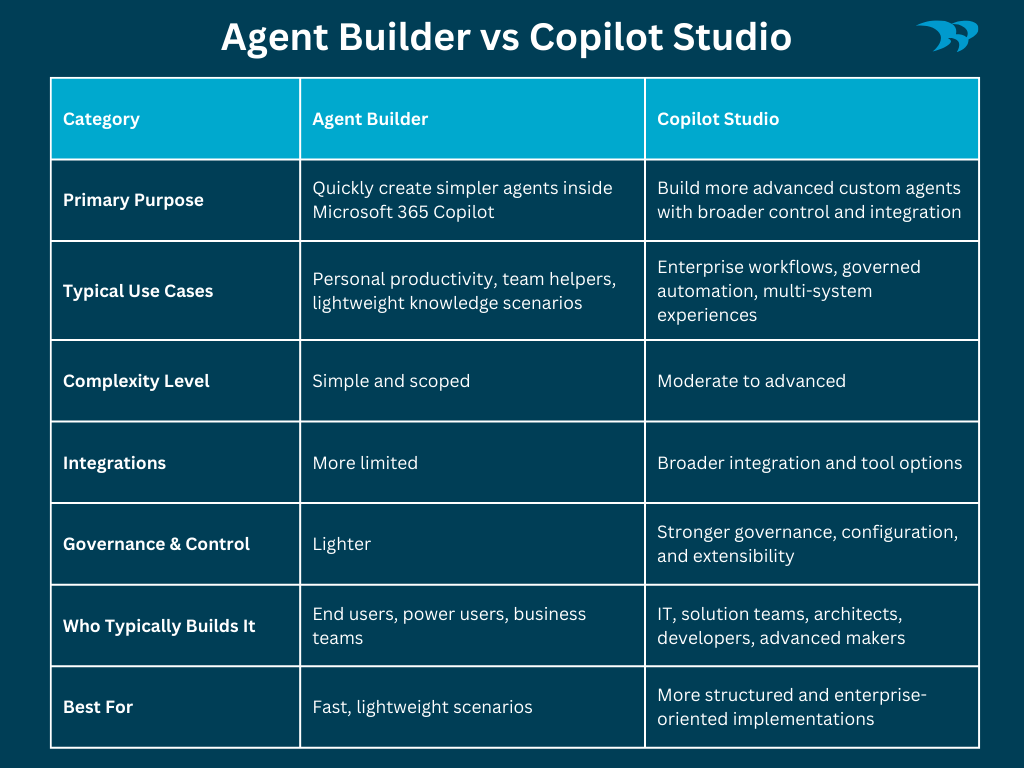
Agent Builder vs. Copilot Studio
Microsoft also offers lighter-weight ways to create agents through Agent Builder. These options are designed to help users create simpler agents within Microsoft 365 Copilot, often with less configuration and technical depth.
Copilot Studio becomes more relevant when requirements go beyond basic scenarios. If an agent needs richer integrations, stronger governance, more control over behaviour, broader connector support, or more deliberate orchestration, Copilot Studio is the more appropriate platform.
The difference is not just about who builds it. It is also about how much control, integration, and governance the solution requires.
Power Apps Still Matter
Power Apps remain important because they handle structured business processes, data entry, validation, role-based experiences, and system interactions in a controlled way. That does not change just because conversational interfaces are becoming more common.
What changes with Copilot Studio is the interactions. In some scenarios, users can begin with a question, a request, or a goal instead of starting with app navigation. The agent can provide information, clarify intent, and route the user toward the right next step. But that does not eliminate the need for the app itself. In many cases, the app still performs the actual transaction, enforces rules, or captures the authoritative data.
That is why it is better to think in terms of intelligent systems, not just smarter apps. The app remains valuable. The agent changes how users access and move through the experience.
How Copilot Studio Works with Power Apps
Copilot Studio can work with Power Apps in several ways, depending on the design.
An agent might answer questions using approved content and then call a Power Automate flow to perform an action. In another case, conversational context might guide a user toward the correct app or process. In some scenarios, copilot capabilities can also be embedded into app experiences themselves rather than treated as a separate front door.
What matters is not whether every solution starts with chat. What matters is whether conversation is the right interaction model for the step the user is in.
For example:
- A user asks a policy question and gets an answer grounded in approved content
- The agent determines that a formal request is needed
- A flow or connected action handles the next step
- The user completes the structured part of the process in the appropriate system
That can feel seamless to the user, but it still depends on good application design, good workflow design, and a clear understanding of where the agent should stop and where the business system should take over.
Common Use Cases for Copilot Studio and Power Apps
A useful pattern is to let the agent handle guidance and triage, while the app handles structured execution.
Internal support scenarios are a strong fit. An employee may start by asking a question about access, policy, equipment, or process. If the issue can be resolved with information, the agent answers. If action is required, the user is routed into the appropriate request flow or business app.
HR and operations scenarios also fit this model. Users often need clarification before submitting a request. An agent can help explain requirements, point to the correct process, and reduce confusion before the structured transaction begins.
Field and frontline scenarios can benefit when speed matters and complex navigation is a poor fit for the environment. In those cases, conversational guidance can reduce friction while the app still enforces the real process and data capture behind the scenes.
Customer or partner-facing experiences can also use this pattern when users need help identifying what they need before entering a formal workflow. The agent can support initial triage, while apps and workflows handle the actual transaction, status updates, or case progression.
These are not separate worlds. The strongest solutions usually combine guided interaction with structured systems rather than trying to force one tool to do everything.
Who Should Build with Copilot Studio?
Many Copilot Studio solutions can be built by capable makers and citizen developers, especially when the scope is narrow and the risk is low. Informational agents, basic routing, and simpler internal use cases can often be developed without a heavy technical footprint.
More technical and architectural involvement becomes important when the solution includes:
- Sensitive or regulated data
- Cross-system actions
- External integrations
- Complex orchestration
- Stronger governance requirements
- Enterprise-scale support expectations
At that point, the discussion is no longer just about building an agent. It is about designing a governed business capability. Data boundaries, permissions, connector use, testing, maintainability, and failure handling all become important.
Quick FAQ
Q: Is Copilot Studio replacing Power Apps?
A: No. Microsoft Copilot Studio does not replace Power Apps. Power Apps and Copilot Agents can work side by side or independently. They serve different purposes and often complement each other. Power Apps handle structured business processes, data entry, validation, and system interactions. Copilot Studio agents provide a conversational and agent-based interaction layer that helps users navigate systems, answer questions, and trigger workflows.
Q: How is Copilot Studio different from AI Builder?
A: AI Builder and Copilot Studio serve different roles in Power Platform. AI Builder provides AI capabilities such as document processing, predictions, and text analysis that can be embedded in apps and flows. Copilot Studio is used to build agents that manage conversations, use knowledge sources, and take actions through tools, connectors, and flows across systems.
Q: What’s the difference between Agent Builder and Copilot Studio?
A: Agent Builder is designed for quickly creating simpler agents inside Microsoft 365 Copilot, often for personal or small-team scenarios using existing Microsoft 365 content. Copilot Studio is a more advanced platform for building agents that require broader integrations, stronger governance, richer orchestration, and support for more complex business scenarios across multiple systems and workflows.
Q: Can citizen developers build Copilot Studio solutions?
A: Yes. Citizen developers and advanced makers can build many Copilot Studio solutions, especially informational agents, FAQ assistants, or simple routing scenarios. However, solutions involving sensitive data, cross-system actions, external integrations, or complex orchestration typically require experienced developers or solution architects.
Q: How does Copilot Studio work with Power Apps?
A: Copilot Studio works alongside Power Apps to guide users through business processes. An agent can answer questions, clarify requests, and trigger actions such as flows or other connected tools. In some scenarios, copilot capabilities can also be embedded into app experiences. Power Apps handle structured processes, including transactions, validation, and authoritative data capture.
Q: Why does governance matter with AI agents like Copilot?
A: Governance is critical because custom agents can interact with enterprise data, knowledge sources, and systems. Without clear permissions, trusted content, and controlled actions, these agents can produce inaccurate responses or trigger unintended outcomes. Proper governance helps ensure agents operate safely, respect data boundaries, and remain reliable as part of business processes.
Why Governance Matters
Copilot and agent experiences are only as reliable as the data, permissions, and controls behind them.
If the knowledge sources are weak, the responses will be weak. If permissions are unclear, the experience can become risky. If the design allows an agent to act too broadly without proper controls, governance problems appear quickly. Microsoft’s own guidance around knowledge sources, authenticated access, and connected actions makes it clear that trust depends on deliberate setup, not just enabling the feature. That is why governance should be treated as part of the design, not as something added later.
Copilot Studio is not a replacement for Power Apps. It is a way to introduce agent-based interaction into solutions that still depend on structured applications, workflows, and governed data.
The real opportunity is not simply to add AI to an existing system. It is to decide where conversational interaction genuinely improves the user experience and where traditional app-based structure should remain in place. Organizations that get this right are usually the ones that treat agents, apps, workflows, and governance as parts of the same overall design problem.
If you’re evaluating how Copilot Studio fits into your Power Platform strategy, let’s talk about how to approach it thoughtfully and with the right foundation in place.